Insert PDF for PowerPoint Icon

Insert PDF for PowerPoint

11.2020
Visual Integrity (Shareware)
Turn PDF pages into PowerPoint slides - Edit objects, attributes and text
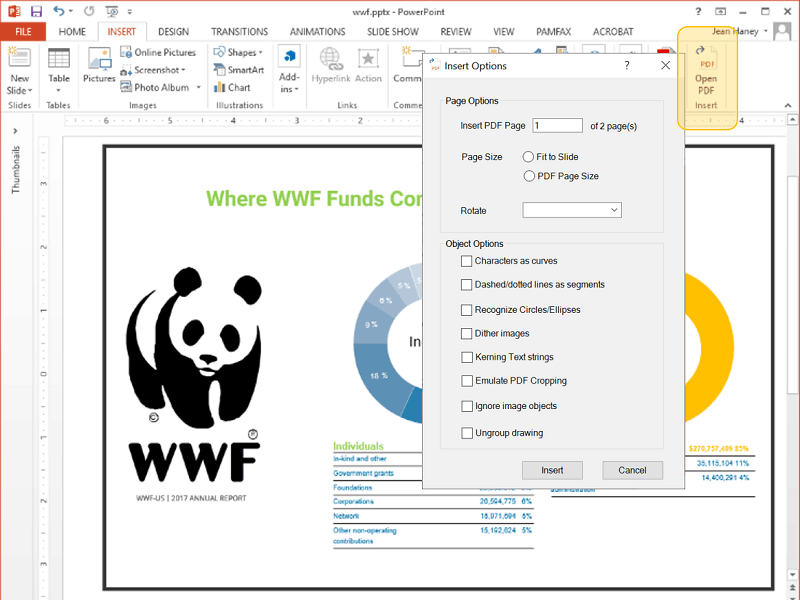
Insert PDF for PowerPoint screenshot
Turn PDF pages into PowerPoint slides
Insert PDF for PowerPoint Modify PDF graphics in Microsoft PowerPoint with Insert PDF. Just open the PDF file in PowerPoint as a slide and then ungroup it. Instantly, all shapes, fonts, text, and attributes can be selected and changed. Additional options including scale and rotation can be set when opening your slide. Using "Open PDF" on the PowerPoint menu, you'll be modifying your converted slides in seconds. It saves time and best of all, no more manual redrawing! Insert PDF for PowerPoint is from Visual Integrity, pioneers in PDF and graphics technologies since 1993. Try it free for 15 days.

Technical details
Title:
Insert PDF for PowerPoint 11.2020 for Windows
Requirements:
Microsoft PowerPoint; 1GB RAM
OS Support:
Win2000, WinXP, Win7 x32, Win7 x64, Windows 8, Windows 10, WinServer, WinOther, WinVista, WinVista x64
Language:
English
License:
Shareware
Release date:
February 4, 2020
Insert PDF for PowerPoint 11.2020 Changelog

Import PDF-based graphics as a slide; Full object, text and attribute editing. Add-in requires Microsoft PowerPoint